Coverage Summary
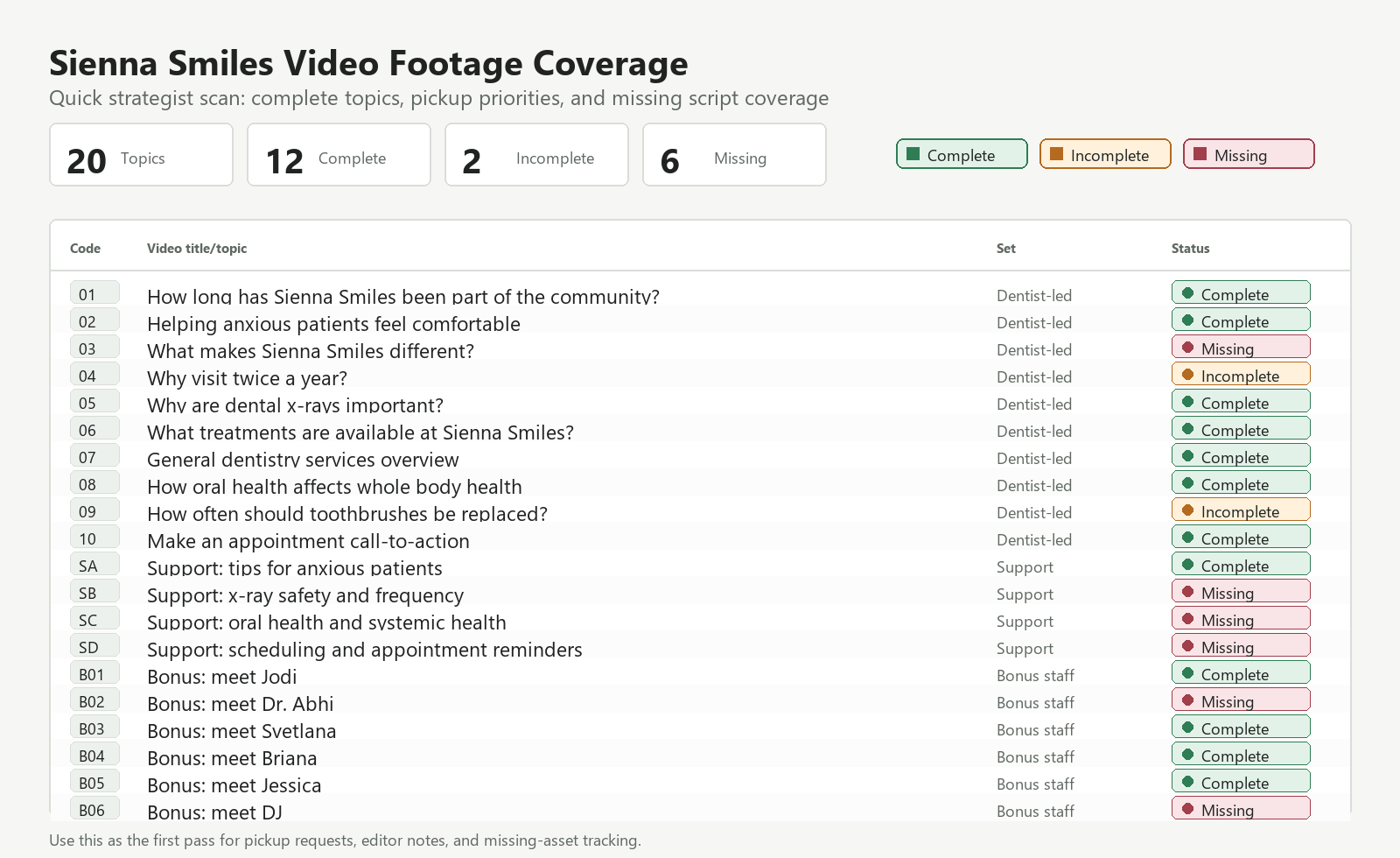
Reviewed against the final master shoot brief and Drive folder inventory. Use this page to decide which scripts can move into edit and which need re-shoots, pickups, or asset requests.
20Scripted topics
12Complete
2Incomplete
6Missing
No topics match the current filter.
Strategist Workflow
Use this sequence when turning the footage review into editor-ready briefs.
- Brief complete topics first, choosing the primary matching file and noting any pickups the editor should stitch in.
- For incomplete topics, write a pickup request before editing unless the missing section can be covered with approved audio and B-roll.
- For missing support-team topics, request new spoken footage and confirm offer terms, pricing, disclaimers, and CTA wording before filming.
- Pull B-roll from CAM 2 for clinic, signage, phone, scanner, aligner/model, and patient-stand-in coverage as needed.
- Keep dentist-led briefs educational. Keep pricing and offer language in support-team videos, captions, or landing-page copy.